

How to Create an Amazon Japan Account in English: 2026 Step-by-Step Guide
Updated July 2026 · 14 min read
Japan Shop Helper Editorial
Tokyo-based · prices & fees verified on real orders
Creating an Amazon Japan account—and ordering from it both inside Japan and internationally—is more straightforward than it looks. The entire registration flow takes about four minutes if you know where the language toggle hides and how to format a Japanese address correctly. This guide walks through every screen, every gotcha, and the payment and shipping details that actually trip people up.
Amazon.co.jp is a separate entity from Amazon.com. Your existing US, UK, or Australian Amazon login does notcarry over. You need a distinct account on the .co.jp domain, but you can use the same email address. Once it’s set up, you gain access to Japan-exclusive products—from limited-edition Kit Kats to ceramics to skincare that never reaches overseas Amazon listings—often at domestic Japanese prices that undercut import markups by 30–60%.
Why Bother with Amazon Japan When You Can Shop In-Store?
Two reasons: availability and logistics. Drugstores like Matsumoto Kiyoshi are great for beauty and snacks, but they don’t stock niche items like regional pottery, specialty kitchen tools, or limited-run stationery. Amazon.co.jp carries over 350 million products—including items from small Japanese sellers who never list on international marketplaces.
If you’re already in Japan, Amazon can deliver to your hotel or Airbnb—sometimes the same day in Tokyo and Osaka. If you’re overseas, Amazon Global Shipping sends eligible items to 65+ countries with upfront customs estimates at checkout. That means no surprise duty charges at the door.
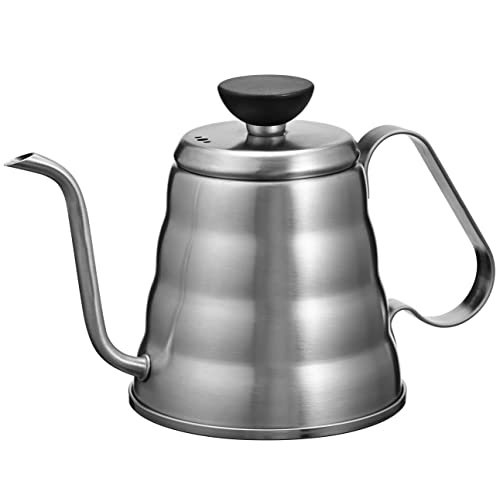
Price comparison tells the story better than any description. A Hario V60 drip kettle (the Buono model) lists at around ¥2,500–¥3,000 on Amazon.co.jp. The same kettle on Amazon.com costs $52–$58 depending on the seller, and on Amazon.co.uk it’s about £48. At current exchange rates, the Japan price is often half or less of what you’d pay overseas, before shipping. For heavier items like cast-iron teapots or rice cookers, the gap can widen further. If you’re curious about how Amazon Japan stacks up against Rakuten for broader shopping, there’s a detailed Amazon Japan vs. Rakuten comparison that breaks down fees, seller reliability, and English support.
What You Need Before You Start
Registration itself requires only an email address and a password. But to actually place an order, you’ll need a payment method and a delivery address. Here’s the full list of things to have ready before you open the site:
Prepaid travel debit cards (Wise, Revolut, etc.) generally work. PayPal is notaccepted on Amazon.co.jp. If you’re in Japan and want to pay cash, you can select convenience-store payment (konbini barai) at checkout and pay at any Lawson, FamilyMart, or 7-Eleven within 6 days.
Pro Tip
Step-by-Step: Creating Your Amazon Japan Account in English
The default language on amazon.co.jp is Japanese, but there’s a built-in English interface. Here’s the exact sequence to register with the English toggle active from the first screen.
1. Switch the Language to English
Open amazon.co.jp in your browser. Before doing anything else, scroll to the very bottom of the page. You’ll see a small globe icon next to the word “日本語” (Japanese). Click it and select English - ENfrom the dropdown. The entire site—navigation, buttons, error messages—reloads in English. This setting persists via cookie, so you won’t need to repeat it on the same browser.
On mobile, the language toggle is in the hamburger menu under “Settings” > “Country & Language.”
2. Click “Create your Amazon account”
After switching to English, click “Sign in” at the top right. On the sign-in page, look below the email/password fields for the link that says “Create your Amazon account.” Click it.
3. Fill In Your Details
The registration form asks for four things: your name (romaji is fine—you don’t need kanji), your email address, a password, and password confirmation. Enter your name as it appears on your credit card to avoid payment verification issues later.
4. Verify Your Email
Amazon sends a 6-digit One Time Password (OTP) to the email you entered. Check your inbox (and spam folder), enter the code, and click “Verify.” Your account is now live.
5. Add a Phone Number for Two-Step Verification
Amazon Japan strongly recommends (and sometimes requires) two-step verification. Go to “Account & Lists” > “Login & Security” > “Two-Step Verification (2SV) Settings.” Add a phone number that receives SMS. International numbers work—include the country code (e.g., +1 for the US, +44 for the UK). If you have a temporary Japanese SIM or an eSIM, that number works too.
Heads Up
Japanese Address Formatting: The Part Everyone Gets Wrong
Japanese addresses work in reverse order compared to Western conventions. They go from largest unit (prefecture) to smallest (room number). Amazon’s English-mode form partially adapts the fields, but you still need to understand the structure to avoid failed deliveries.
Here’s a real-world example. Suppose your hotel is at: Shinjuku Granbell Hotel, 2-14-5 Kabukicho, Shinjuku-ku, Tokyo 160-0021. Here’s how each form field maps:
| Amazon Field | What to Enter | Notes |
|---|---|---|
| Country/Region | Japan | Select from dropdown |
| Postal Code | 160-0021 | 7 digits with hyphen; auto-fills prefecture |
| Prefecture | Tokyo | Auto-selected after postal code entry |
| City/Ward/Town | Shinjuku-ku Kabukicho | Ward + neighborhood together |
| Street address | 2-14-5 | Block-building-unit format |
| Building name / Room | Shinjuku Granbell Hotel (Guest: Your Name) | Add “Guest:” so front desk knows |
| Phone number | Your mobile number | Courier calls if lost; include country code if non-JP |
Pro Tip
For international addresses(if you’re ordering from outside Japan for Global Shipping), select your country from the dropdown and enter your address in your normal format. Amazon handles the conversion. The postal code field adapts to your country’s format.
If you’re splitting time between a hotel and an Airbnb, you can save multiple addresses under “Your Addresses” in account settings and choose at checkout. Just confirm with your hotel that they accept deliveries for guests—most major chains (APA, Toyoko Inn, Hilton, Marriott) do, but some boutique ryokan do not.
Payment Methods: What Works and What Doesn’t
Amazon.co.jp accepts the following payment methods for international users:
| Method | Works for Overseas Buyers? | Notes |
|---|---|---|
| Visa / Mastercard | Yes | Most reliable option; card name must match account name |
| AMEX | Yes | May trigger fraud alert on first use; call your bank first |
| JCB | Yes | Japanese card network; fully supported |
| Diners Club | Yes | Less common but accepted |
| Prepaid (Wise, Revolut) | Usually yes | Load yen balance first for best rate |
| PayPal | No | Not accepted on Amazon.co.jp |
| Convenience store (konbini) | In-Japan only | Pay cash at Lawson, FamilyMart, or 7-Eleven within 6 days |
| Amazon Gift Card (Japan) | Yes | Buy at konbini or online; JPY denominations only |
A practical note on currency: Amazon.co.jp charges in Japanese yen. Your card issuer converts to your home currency at their rate, plus any foreign transaction fee. If your card charges 2.5% on foreign transactions, a ¥10,000 order costs you an extra ¥250 in fees. Cards with 0% foreign transaction fees (many travel cards, Chase Sapphire, Wise, etc.) sidestep this entirely.
Heads Up
Shipping: Domestic Delivery, Global Shipping, and Forwarding Services
Shipping is where Amazon Japan gets genuinely impressive—and also where most confusion lives.
Domestic Shipping (You’re in Japan)
Orders fulfilled by Amazon (“Ships from and sold by Amazon.co.jp” or FBA items) ship free on orders over ¥3,500. Below that threshold, shipping is ¥410 for standard or ¥510 for express. Prime members get free shipping on all Prime-eligible items with no minimum.
In Tokyo, Osaka, and Nagoya metro areas, same-day delivery is available on orders placed before roughly noon. Next-day delivery covers most of Honshu. Hokkaido and Okinawa typically add 1–2 days. Yamato Transport and Japan Post handle most last-mile delivery—both are extraordinarily reliable with specific time-slot options (e.g., 14:00–16:00).
Pro Tip
Amazon Global Shipping (You’re Outside Japan)
Amazon Global Shipping, also called AmazonGlobal, delivers eligible items directly from Japan to 65+ countries. At checkout, Amazon calculates shipping cost, import duties, and taxes upfront. You pay the total before the package ships, so there’s no customs bill waiting at your door.
Shipping costs vary by weight and destination. As a benchmark: a 1 kg package to the US runs roughly ¥1,000–¥1,800 for standard (7–12 business days) and ¥2,500–¥3,500 for expedited (3–5 business days). A 3 kg package to the UK costs around ¥2,000–¥3,000 standard.
Not every item qualifies for Global Shipping. Items sold by third-party sellers often don’t, and certain product categories (aerosols, lithium batteries, flammable goods) are restricted. Filter your search results by “International Shipping Eligible” to avoid dead ends.
Package Forwarding Services (For Items That Won’t Ship Internationally)
If an item you want doesn’t qualify for Amazon Global Shipping, a forwarding service bridges the gap. Services like Tenso, Buyee, and ZenMarket provide you with a Japanese address. You ship the Amazon order to that address, and they forward it to your home country.
Forwarding adds cost: typically ¥500–¥1,000 in handling fees on top of international shipping. Tenso charges ¥300 per package consolidation if you combine multiple orders into one shipment. For a deeper look at proxy and forwarding options, check the Japanese proxy shopping services guide.
Navigating Amazon.co.jp: English Interface Tips and Hidden Features
Even with the English toggle active, some elements remain in Japanese. Product titles, descriptions, and reviews from Japanese sellers appear in their original language. Here’s how to deal with that:
Auto-translate product pages:Chrome and Edge offer built-in page translation. Right-click anywhere on a product page and select “Translate to English.” The translation is rough but functional—good enough to understand ingredients, dimensions, and material descriptions.
Search in English:Amazon Japan’s search engine understands English queries surprisingly well. Searching “matcha powder” returns relevant results alongside the Japanese term “抹茶粉末.” For niche items, adding the Japanese term improves results. Google Translate the product name and paste it into the search bar.
Filter by Prime:Click “Prime” in the left sidebar to show only items eligible for fast, free shipping (domestic) or reliable Amazon fulfillment (international). This filters out many third-party sellers with inconsistent shipping.
Review translation:Below each Japanese review, Amazon often shows a “Translate review to English” link. Click it for an on-page machine translation. The quality varies, but star ratings and photo reviews are universally readable.

Best Things to Buy on Amazon Japan (That You Can’t Get Elsewhere)
Having an Amazon Japan account is only useful if you know what’s worth buying. Here are categories where the price gap or exclusivity makes the .co.jp marketplace particularly valuable:
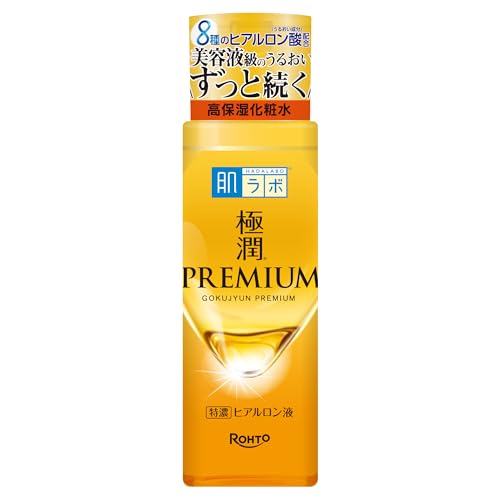
Japanese skincare and beauty: Brands like Hada Labo, Canmake, and Biore sell at domestic retail prices. Hada Labo Gokujyun Premium Lotion is ¥990 on Amazon.co.jp versus $18–$24 on Amazon.com. That’s a consistent 50%+ markup on the international listing. For a curated breakdown of what’s worth picking up, the Japanese skincare routine guide covers product recommendations by skin type.
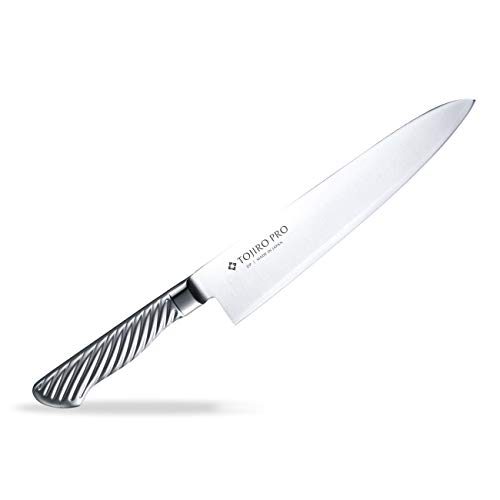
Kitchen tools:Japanese knives, ceramic graters, tamagoyaki pans, and specialty teapots. A Tojiro DP series gyuto runs ¥6,500–¥16,500 on Amazon.co.jp depending on blade length—consistently below what the same knives fetch on Western Amazon sites.
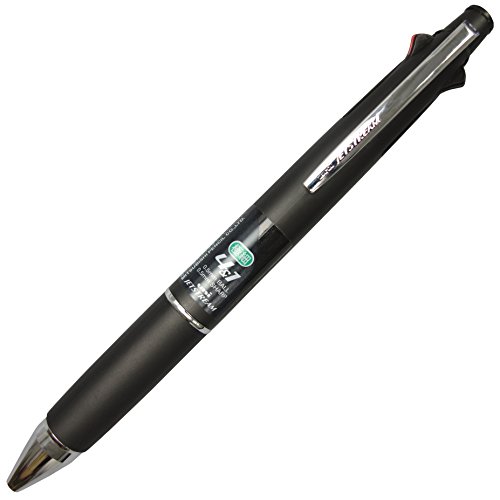
Stationery:Pilot, Uni, and Zebra pens in colorways and limited editions that don’t reach international markets. A Uni Jetstream 4&1 multi-pen is ¥600–¥800 domestically versus $16–$20 imported.
Snacks and pantry items: Regional Kit Kat flavors, premium instant ramen, and matcha products ship internationally when sold by Amazon directly. A box of 12 Kyoto matcha Kit Kats runs about ¥800 on Amazon.co.jp.
Electronics:Tread carefully here. Japanese electronics often use 100V power, which differs from the 110–120V standard in North America and the 220–240V standard in Europe. Small USB-powered devices (portable chargers, earbuds) are universal. Larger appliances (rice cookers, hair dryers) may need a voltage converter. Also, region-locked items like Blu-ray players won’t play Region A/B discs, so check specifications before buying.
Troubleshooting: Common Issues and How to Fix Them
“This item cannot be shipped to your selected delivery location”
This means the seller doesn’t offer international shipping for that item. Three options: (1) look for the same product from a different seller on the listing page—click “Other Sellers on Amazon” to check; (2) use a forwarding service like Tenso; (3) order it to a Japanese address if you’re currently in Japan.
Credit Card Declined
Almost always a fraud-prevention block from your bank, not an Amazon issue. Contact your card issuer to authorize Amazon.co.jp transactions. Some banks let you do this through their mobile app in real time.
Account Locked After Registration
Amazon occasionally locks new accounts created from foreign IP addresses and requests identity verification (a scan of your ID or credit card statement). This is annoying but normal. Upload the requested documents through the link in the notification email. Verification typically completes within 24 hours.
Site Reverts to Japanese After Clearing Cookies
The English language preference is stored in a cookie. If you clear your browser data or switch devices, you’ll need to set it again. Bookmark this direct URL for quick access: amazon.co.jp/?language=en_JP. The “language=en_JP” parameter forces the English interface.
Delivery to Hotel: Package Not Found
Hotel front desks receive dozens of packages daily. If yours isn’t at reception, confirm the tracking number on Amazon shows “Delivered,” then ask the front desk to search by your name and tracking number. Adding “Guest: [Your Full Name] / Check-in: [Date]” to the building name field dramatically reduces mix-ups.
Is Amazon Prime Japan Worth It for Tourists?
Amazon Prime Japan costs ¥600/month (roughly $4 USD) or ¥5,900/year. It includes free domestic shipping on all Prime items, same-day delivery in metro areas, Prime Video (with a largely Japanese-language library), Prime Reading, and Amazon Music.
For a short trip (1–2 weeks), the 30-day free trial makes sense if you plan to place 3+ orders. Sign up, enjoy free same-day shipping during your trip, and cancel before the trial ends. Amazon does not auto-charge if you cancel in time.
For long-term overseas shoppers, Prime Japan is less useful because Prime shipping benefits apply only to domestic Japanese deliveries. International shipping fees remain the same whether or not you have Prime. The ¥600/month is better spent on a forwarding service consolidation if you order frequently.
Quick-Reference Setup Checklist
Frequently Asked Questions
Can I use my existing Amazon.com account on Amazon.co.jp?
No. Amazon.co.jp is a separate marketplace with a separate account system. You can use the same email address to register, but you need to create a new account. Your purchase history, saved addresses, and payment methods do not transfer between Amazon.com and Amazon.co.jp.
Does Amazon Japan ship to the United States, UK, and other countries?
Yes, through Amazon Global Shipping. Eligible items can ship to 65+ countries including the US, UK, Canada, Australia, Germany, and France. At checkout, Amazon calculates shipping, import duties, and taxes upfront. Not all items qualify—filter by “International Shipping Eligible” to see what’s available.
Is it cheaper to buy Japanese products on Amazon.co.jp vs. Amazon.com?
Almost always, yes. Japanese skincare, kitchen tools, and stationery typically cost 30–60% less on Amazon.co.jp compared to Amazon.com. The savings come from buying at domestic Japanese prices rather than paying import markups from third-party resellers. Factor in international shipping (¥1,000–¥3,500 depending on weight and speed), and most orders over ¥3,000 still come out ahead.
Can I pay with PayPal on Amazon Japan?
No. Amazon.co.jp does not accept PayPal. Use a Visa, Mastercard, AMEX, JCB, or Diners Club credit/debit card. Prepaid cards from Wise and Revolut generally work as well. If you’re physically in Japan, you can also pay cash at a convenience store (konbini payment).
What happens if I need to return an item purchased on Amazon.co.jp?
Items sold and fulfilled by Amazon can be returned within 30 days of delivery. If you’re in Japan, the return process is straightforward—Amazon provides a prepaid shipping label for most items. If you shipped internationally, you’re responsible for return shipping to Japan, which often costs more than the item itself. Check the return policy on the product page before ordering internationally.
Is there a way to see Amazon.co.jp entirely in English, including product descriptions?
The language toggle changes the site’s navigation, menus, and checkout flow to English, but product titles and descriptions remain in the seller’s original language (usually Japanese). Use your browser’s built-in translation feature (right-click > “Translate to English” in Chrome or Edge) to translate individual product pages. The translation is imperfect but adequate for understanding product details, sizes, and ingredients.
Disclosure
This article contains affiliate links. We may earn a commission when you buy through them, at no extra cost to you. Every pick is an honest recommendation.
Ready to order from Japan?